USA
USA United Kingdom

Visual strain and musculoskeletal disorders are common in office workers across the US and beyond. Ergonomics assessments can identify issues and inform interventions that significantly reduce injuries and sick days, but it’s important to use the right postural analysis methodology.
There are several different ergonomics assessment tools, and some are more suitable for assessing office ergonomics than others.
In this guide, we list the best postural analysis tools for assessing office ergonomics, explaining what each tool evaluates, when it’s most appropriate, and how it can help organizations identify risks, prioritize interventions, and support healthier, more productive workforces.
What are ergonomic assessment tools?
Ergonomic assessment tools are structured methods used to evaluate the risk of musculoskeletal injuries and other health issues associated with workplace postures and tasks.
If you’re not sure what ergonomics assessments are, we recommend taking a moment to read our dedicated guide.
In office settings, these tools focus primarily on postural analysis, examining how employees sit, reach, and interact with their workstations to identify potential strain on the neck, shoulders, back, and wrists.
While some tools rely on high-tech equipment, many widely used office-focused tools are observational methods. They provide a standardized way to score and compare postures, helping organizations identify which workstations or employees are at higher risk.
Some of the key benefits of using ergonomic assessment tools in office environments include:
- Objective risk identification
- Consistent evaluations and ergonomics reporting
- Support for decision-making
- Compliance and documentation
Related – What is the best approach to office ergonomics management?
Recommended postural analysis tools for office ergonomics assessments
Not all postural analysis tools are equally suited to office environments. Some were designed for tasks more common to industrial work environments and may over or underestimate risk in low-force office work.
The following tools are widely recognized for office ergonomic assessments and provide a practical, evidence-based way to evaluate posture, workstation setup, and musculoskeletal risk.
ROSA – Rapid Office Strain Assessment
Best for: Comprehensive office workstation assessments
Designed specifically for evaluating office environments, ROSA is a key ergonomic assessment tool for sound office ergonomics.
ROSA evaluates key workstation components such as chairs, monitors, keyboards, mice, and telephones. It also factors in the duration of use, giving a realistic picture of how posture and equipment contribute to risk.
Rapid Office Strain Assessment scores help organizations prioritize workstation improvements and track the effectiveness of interventions. They provide clear, actionable data to support investment in ergonomic equipment and policy changes that reduce injury risk across the workforce.
RULA – Rapid Upper Limb Assessment
Best for: Detailed analysis of upper body posture
RULA focuses on the neck, shoulders, upper arms, forearms, wrists, and trunk (all of which are common areas of discomfort and injury among office workers), producing a risk score that highlights urgent areas for intervention.
While it doesn’t include lower limbs or workstation equipment, it’s highly effective for identifying upper limb strain from prolonged computer use or repetitive tasks.
The RULA methodology helps pinpoint specific postural issues that may be causing discomfort, enabling targeted interventions and more efficient use of resources.
REBA – Rapid Entire Body Assessment
Best for: Assessing whole-body posture in non-standard office setups.
REBA evaluates the entire body, including legs and trunk, and is useful for situations where office workers frequently lean, reach, or use non-traditional workstations. While it’s less precise than RULA for upper limb analysis, it gives a broader view of musculoskeletal risk.
REBA is ideal for hybrid or flexible office environments, helping organizations ensure that all workstations, traditional or unconventional, are safe and ergonomically sound.
To make this easy for organizations, we provide virtual ergonomics assessments, delivering expert guidance and actionable recommendations remotely, making it easy to support home-based and hybrid employees. Read more about our virtual ergonomics assessments.
ROSA vs RULA vs REBA for office ergonomics assessments – Quick comparison table
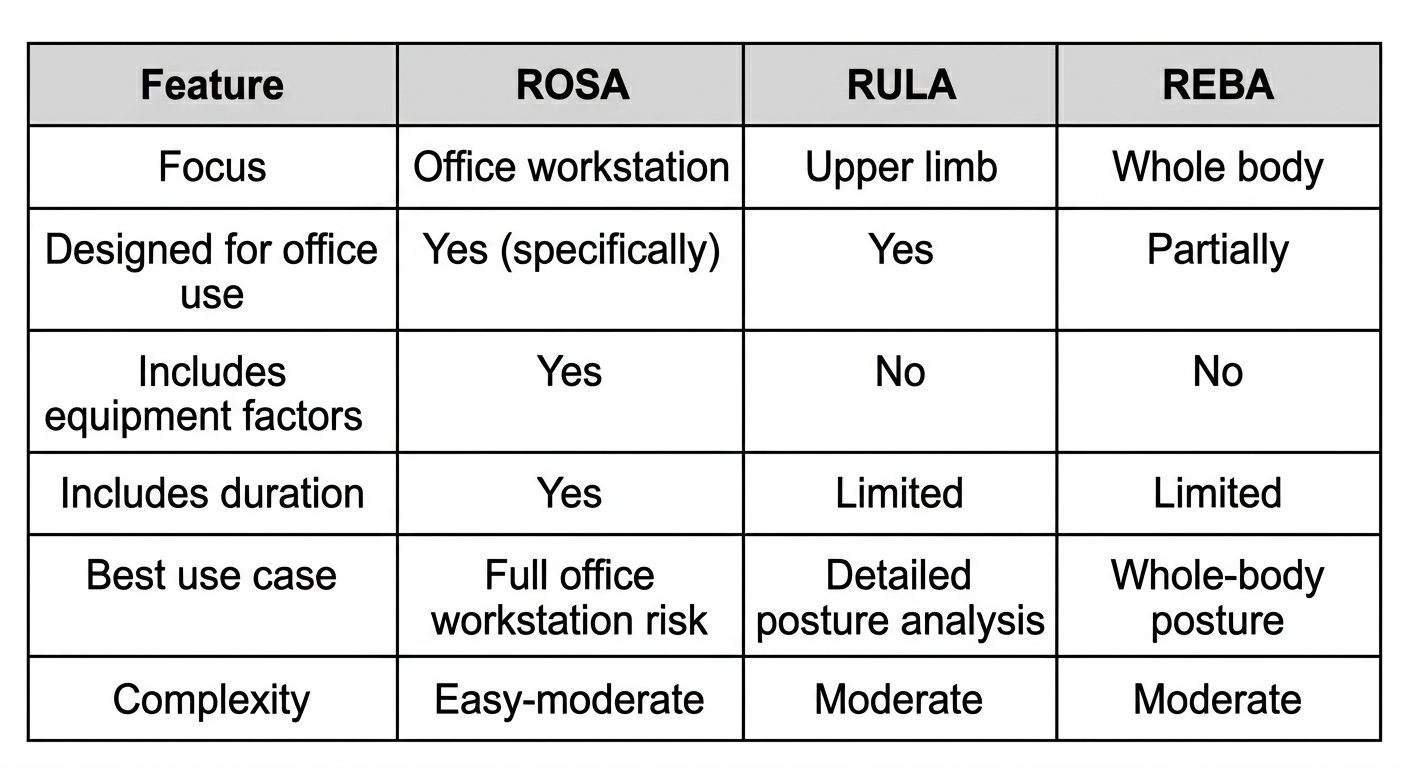
How to choose the right ergonomics assessment tool for office environments
Selecting the right ergonomic assessment tool is critical to getting meaningful results without wasting time or resources. Each postural analysis method has strengths and limitations, and the best choice depends on the office environment, employee tasks, and risk management goals.
Here’s a practical framework you can use as a general guide:
1 – Identify the assessment purpose
- Screening vs. detailed investigation: If your goal is to quickly identify high-risk workstations across a large team, tools like ROSA are ideal. For focused investigations of reported discomfort, RULA or REBA can provide more detailed postural insights.
2 – Consider the work environment
- Standard desk-based setups: ROSA provides a full workstation-focused assessment.
- Hybrid or flexible workstations: REBA can capture whole-body postural risks associated with standing desks, laptops, or unconventional layouts.
- Tasks with high upper limb strain: RULA is most effective for identifying repetitive strain risks in shoulders, arms, and wrists.
3 – Evaluate the level of detail required
- High-level scoring: ROSA is quick and provides clear, actionable scores for management decisions.
- Detailed posture analysis: RULA and REBA allow for in-depth review of joint angles and postural deviations, useful for pinpointing specific interventions.
4 – Balance time, resources, and ROI
- Some tools are faster and easier to apply, making them better for large-scale assessments.
- More detailed methods require trained assessors and longer observation, but may be necessary for high-risk employees or workstations. In these scenarios, it may be beneficial to outsource your office ergonomics assessments to a third-party expert like Cardinus.
5 – Combine methods when appropriate
- In many cases, using ROSA for broad screening and RULA for detailed follow-up strikes the right balance between efficiency and accuracy.
- Combining tools allows organizations to prioritize interventions effectively while ensuring high-risk postures are addressed.
Common mistakes when using ergonomics assessment tools
Many organizations invest in ergonomic assessments but fail to achieve meaningful risk reduction due to common implementation mistakes. These include:
- Using tools without trained assessors
- Treating assessments as one-off exercises rather than ongoing processes
- Focusing on equipment without evaluating posture and work habits
- Failing to prioritize interventions based on risk level
- Not documenting findings clearly or tracking improvements
Understanding the limitations of ergonomics assessment tools
While ergonomic assessment tools like ROSA, RULA, and REBA are highly valuable for office risk management, it’s important for safety teams to understand their limitations.
No tool can capture every aspect of musculoskeletal risk on its own, and recognizing these constraints ensures assessments are used effectively and responsibly.
Ergonomics assessment tools are limited due to the following:
Snapshot in time – Most observational tools evaluate posture during a single period or task, rather than continuously throughout the workday. This means that temporary variations in posture or workload may not be captured, potentially underestimating risk in some situations.
Observer-dependent scoring – Scoring relies on the assessor’s judgment, so differences in experience or interpretation can affect results. Training and standardized protocols help reduce variability, but some subjectivity remains.
Limited measurement of muscle activity – Tools primarily focus on joint positions, angles, and load estimates. They do not directly measure muscle activation, fatigue, or discomfort, so they should be complemented with employee feedback, discomfort surveys, or other monitoring methods.
Not a standalone solution – Ergonomic assessment tools should be used as part of a comprehensive risk management strategy, not as the sole determinant of interventions. Combining tool-based assessment with training, workstation adjustment, and organizational policies ensures the best outcomes.
When to consider professional support for office ergonomics management
While basic ergonomic screening can be conducted internally, organizations should consider specialist support if current initiatives are proving to be ineffective, or if challenges faced are slowing down intervention or seem operationally prohibitive.
For instance, you may be finding it difficult to assess large or distributed workforces or struggling to effectively assess hybrid or remote workers. You may also be re-investigating the same kind of musculoskeletal complaints time and time again.
Those preparing for regulatory audits or implementing organization-wide ergonomics programs also often benefit from external expertise, ensuring assessments are consistent, defensible, and aligned with best practices.
In short, if the responsibility starts to feel too large or results aren’t what you or your team were hoping for, specialist support can help you achieve faster, more effective, and more sustainable outcomes.
Get better ergonomics results with Cardinus
Ergonomics initiatives can deliver significant benefits, from reduced injury rates to improved productivity. However, implementing assessments effectively and maximizing return on investment can be complex and resource-intensive without specialist support.
At Cardinus, we help organizations achieve measurable results. Our services include:
- Expert ergonomics consultancy to support and guide in-house teams
- Comprehensive office ergonomics assessments using validated postural analysis tools
- A cloud-based office ergonomics platform to efficiently manage large-scale assessment programs
- Fully managed ergonomics programs, from risk identification through to intervention and ongoing support
Whether you’re screening large teams, investigating reported discomfort, or optimizing hybrid work environments, partnering with Cardinus ensures your ergonomics program is efficient, evidence-based, and delivers lasting value.
Contact us today to discuss how we can support your organization.